Dusk · free & open source · MIT
Warm screen. Calm eyes.
Dusk is a free, open-source Mac app that filters blue light down to 500K, dims below minimum brightness and removes PWM flicker.
- No network calls
- No account
- No analytics
- ~0% CPU idle
- 2.2 MB
Free forever · macOS 14+ · Apple silicon & Intel · v0.4.0
 Dusk
Brightness
Built with ♥ by Aziz
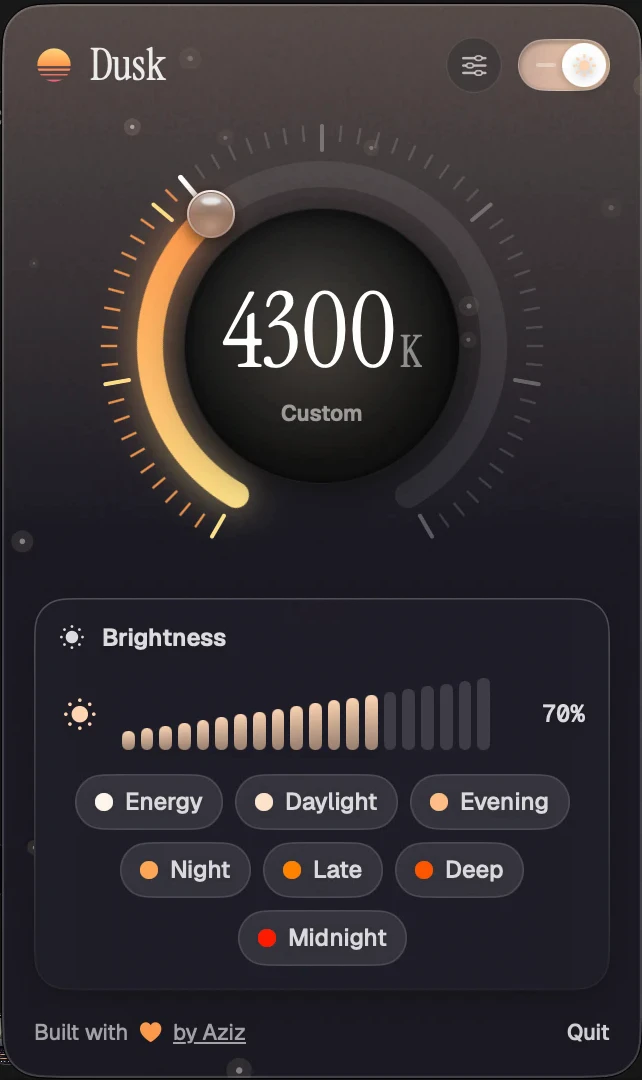
Try it: drag the sliders or pick a preset. Simulated preview; on your Mac, Dusk adjusts the real display.
I'm a night person. Late hours are when I work best, but hours of staring at a bright screen wore my eyes out. So I built Dusk: a free app that warms the screen, dims it past the usual limit and stops backlight flicker. I use it every night.
What Dusk does
Blue light filter
From 6500K daylight down to a deep 500K red.
Flicker-free mode
Backlight held at 100%, brightness lowered in software.
No dithering
Turns off temporal dithering on Apple silicon, so the image stops shimmering.
Dim below minimum
Go darker than the brightness keys allow, down to 5%.
Every screen its own
Warmth, brightness and on/off per display. Unplug and replug, it remembers.
Night schedule
Warms on its own during the hours you choose.
Seven presets
Energy, Daylight, Evening, Night, Late, Deep and Midnight.
Test it yourself
A Test button checks flicker-free and No dithering on your hardware, with live traces and full-screen tests.
Light on battery
About 0% CPU in the menu bar. No account, no analytics, no network calls.
Night Shift stops at 2700K. Dusk goes to 500K.
Most filters stop at a light tint. f.lux bottoms out at 1200K and Night Shift near 2700K. Dusk removes nearly all blue light, all the way down to 500K.
Flicker-free dimming for MacBooks
Many MacBooks dim with PWM, switching the backlight on and off hundreds of times a second at low brightness. Dusk keeps the backlight at full power and dims in software through the gamma table. On mini-LED MacBook Pros the backlight pulses at every brightness, so Dusk tells you flicker-free can't help there.
Flicker-free on external monitors
If your monitor supports DDC, Dusk holds its backlight at full and dims the picture instead. With a second screen plugged in, a picker lets you warm the laptop for reading and leave the monitor alone for photo work.
Ready in a minute
- 01
Download
Grab the free zip and drag Dusk to Applications.
- 02
Pick your warmth
One slider, seven presets. Go as deep as you like.
- 03
Forget about it
Dusk lives in the menu bar and keeps your screen warm.
Prefer Homebrew?
brew install --cask s-azizkhan/tap/duskDusk vs Night Shift vs f.lux vs Sundown
| Feature | Dusk | Night Shift | f.lux | Sundown |
|---|---|---|---|---|
| Price | Free | Free | Free | $4.99/mo, $39/yr, $79 lifetime |
| Open source | Yes, MIT | No | No | No |
| Warmest setting | 500K | ~2700K | 1200K | 500K |
| Dim below minimum | Yes | No | No | Yes |
| Flicker-free mode | Yes | No | No | Yes |
| Anti-dithering | Yes | No | No | Yes |
| Account or licence | None | None | None | Licence key |
Other apps' details from their public websites, November 2026.
FAQ
- What is Dusk?
- A free, open-source macOS menu-bar app. It filters blue light (500K to 6500K), dims below minimum brightness, reduces PWM flicker and turns off temporal dithering.
- Is there a free alternative to f.lux or Sundown for Mac?
- Yes. Dusk is free and open source (MIT), with a 500K blue light filter, dimming below minimum brightness, flicker-free mode and anti-dithering.
- How do I reduce PWM flicker on a MacBook?
- Flicker-free is on by default in Dusk. The backlight stays at 100% and brightness is lowered in software through the gamma table.
- How do I disable temporal dithering on Apple silicon?
- No Dithering is on by default in Dusk (Display Health). Check it with: ioreg -lw0 | grep -i enableDither
- Does flicker-free work on every MacBook?
- It helps screens that pulse their backlight when dimmed. Mini-LED MacBook Pros (14" and 16", 2021 and later) pulse at every brightness, even 100%, so it can't help there. Dusk spots this, says so, and leaves it off by default.
- How is Dusk different from Night Shift?
- Night Shift stops around 2700K. Dusk goes to 500K, dims to 5% and adds flicker-free and anti-dithering modes.
- Can I set each monitor differently?
- Yes. With two or more screens, a picker shows up next to the Dusk name. Each screen keeps its own warmth, brightness and on/off.
- Does flicker-free work on an external monitor?
- If the monitor supports DDC, yes: Dusk holds its backlight at full and dims the picture in software. Monitors that don't answer over DDC are left alone. One external monitor at a time for now.
- Does Dusk help with sleep or eye strain?
- Dusk is a display utility, not a medical device. Many people find a warmer, dimmer screen more comfortable at night.
- Why does macOS warn me when I open it?
- This early build is not notarised yet. Run: xattr -dr com.apple.quarantine /Applications/Dusk.app